Issue #83: Liquid Glass goes mandatory, Foundation Models opens up, and non-modal panels in SwiftUI
Hey folks 👋
iOS 27, iPadOS 27, macOS 27, Xcode 27, and Swift 6.4 are all still in beta, with stable expected in September next to the new iPhones. Two of this cycle's biggest changes are worth acting on now rather than in the fall scramble: the design system stops being optional, and the on-device AI story quietly got a lot bigger. Plus a sharp SwiftUI pattern from someone who used to build these APIs at Apple🧪
Liquid Glass is not optional anymore
Liquid Glass shipped with iOS 26 last year, and Apple gave everyone a grace period: drop UIDesignRequiresCompatibility into your Info.plist and your app kept its pre-glass look. That hatch closes in iOS 27. Xcode 27 removes the flag entirely, and the key is silently ignored if you leave it in.
<!-- Ignored by Xcode 27. There is no replacement compatibility flag. -->
<key>UIDesignRequiresCompatibility</key>
<true/>
The flag was always app-wide and binary, so it was never the right tool for fine control anyway. Per-component styling is where the real control lives: UINavigationBarAppearance, UITabBarAppearance, and SwiftUI's glass styling modifiers let you shape individual controls without opting the whole app out of the design. And this is not only a paint job. The floating tab bar changes safe area bottom insets, and transparent navigation bars change scroll view inset behavior and scroll edge handling, so you are looking at real geometry shifts, not just new colors.
Xu Yang put together a field guide to the UIKit traps, drawing on a real project from SLIT_STUDIO developer Megabits. It walks through adaptation issues across sheets, navigation, popovers, and toolbars, and gets into the lower-level behavior of UIBarButtonItem custom views, CABackdropLayer, and scroll edge effects, with runnable demos for each. One of the bugs he documents (FB20865249) has been around since the first iOS 26 release and is still open in iOS 27, so keep simulators for each OS version you support, because the same UI really can behave differently on iOS 18, 26, and 27.
The move that pays off: build with the Xcode 27 beta against the iOS 27 SDK, no compatibility flag, and run the app now. Treat it as an audit, not a rewrite. And do not fake the material with a blur hack or a semi-transparent image, since those break under Reduce Transparency and Increase Contrast, which the real glass APIs respect. Worth doing on your schedule before the Xcode 27 SDK becomes the App Store submission minimum, which is expected in early 2027 and which flips every app to glass whether you planned for it or not.
 Megabits
Foundation Models opens up to any model
Foundation Models launched in iOS 26 as a genuinely useful thing: a free, private, offline on-device model with type-safe structured output through @Generable, all behind a small LanguageModelSession API. The catch was the ceiling. The on-device model is around 3B parameters with no real long-context mode, so anything heavier meant bolting on a separate cloud SDK with its own history management and error handling.
import FoundationModels

// iOS 26: the on-device model was the only backend
let session = LanguageModelSession(
    instructions: "Summarize the input in one sentence."
)
let response = try await session.respond(to: text)
print(response.content)
WWDC26 turned that single backend into a plug. There is now a public protocol layer that any model can implement, so the same LanguageModelSession code runs against a different backend with essentially a one line swap. You keep your prompts, your structured output, and your session logic, and you change the model:
// iOS 27 (beta): same session API, different backend
let model = PrivateCloudComputeLanguageModel()   // Apple's cloud model, larger context
// let model = MLXLanguageModel(modelID: "mlx-community/...")  // any MLX model from Hugging Face
let session = LanguageModelSession(model: model)
let response = try await session.respond(to: prompt)
Options at launch include the on-device SystemLanguageModel, Apple's cloud model over Private Cloud Compute (bigger context and reasoning, with the stateless privacy guarantees), a model you package and ship through Swift Package Manager, and any MLX-format model. The @Generable structured output path is unchanged, so you keep decoded Swift values whichever model you point at. One nice detail for smaller shops: App Store Small Business Program developers, under 2 million first-time downloads, can use Foundation Models on Private Cloud Compute with no cloud API cost.
All of this is iOS 27 and macOS 27, so it is beta until the fall. If you are new to the framework, Bill Morefield's getting-started walkthrough is a good on-ramp before the provider stuff.
Apple Just Opened the Foundation Models Framework to Any LLM Provider What the new provider protocol means for real apps, and the decisions it now hands you. DEV Community · ArshTechPro
Non-modal panels in SwiftUI
A modal sheet takes over. Sometimes you want the opposite: a panel that sits over your content while the user keeps interacting with the map, canvas, or list behind it. SwiftUI has the pieces for this with presentationDetents and presentationBackgroundInteraction, and the result is the inspector-style panel you see in a lot of Apple's own apps.
swift
.sheet(isPresented: $showPanel) {
    PanelContent()
        .presentationDetents([.height(120), .medium, .large])
        .presentationBackgroundInteraction(.enabled(upThrough: .medium))
        .interactiveDismissDisabled()
}
The upThrough detent is the trick worth remembering: background interaction stays on while the panel is small or medium, and the panel goes properly modal once it expands to large. Natalia Panferova, who worked on SwiftUI at Apple, takes this further and builds a reusable, detent-based API that adapts on its own, showing a bottom panel in portrait and an edge-aligned panel in landscape. If you have been reaching for a UIKit container or a fully custom presentation to get this behavior, her write-up is the native way to do it.
 Matthaus Woolard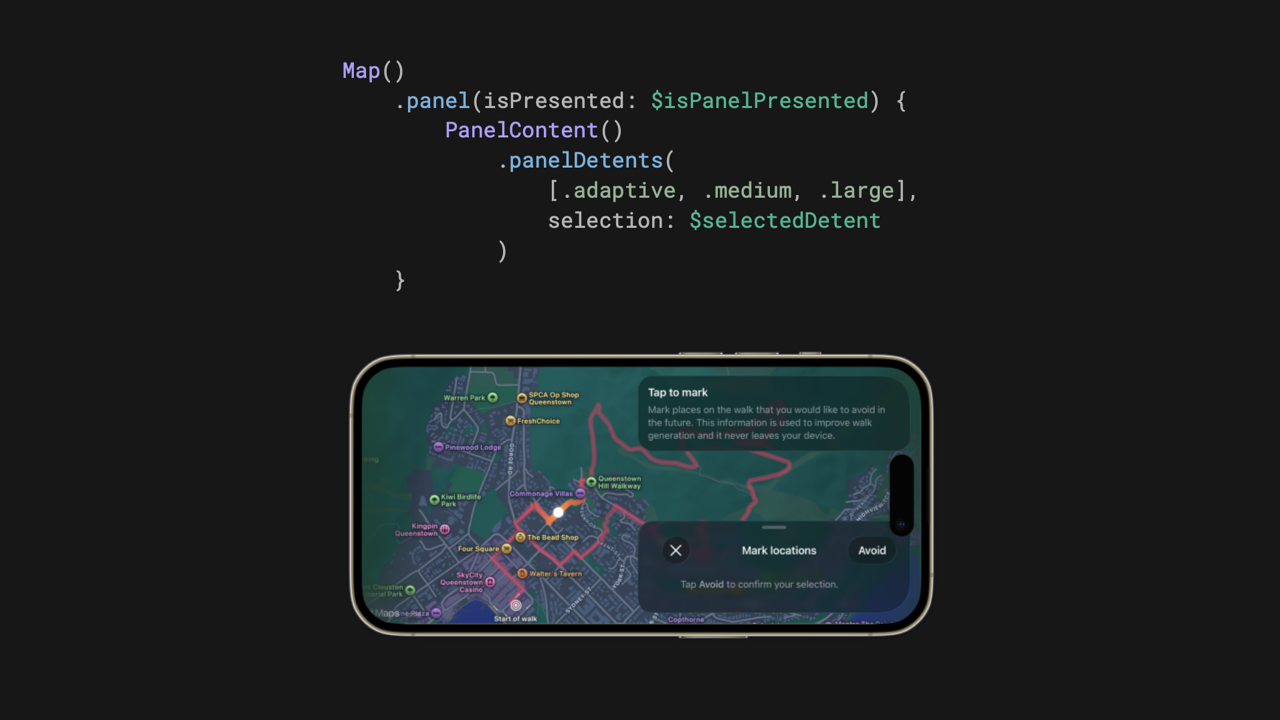
Quick Hits
- WWDC26 also introduced Core AI, a lower-level companion to Foundation Models for running arbitrary on-device models like Qwen, Mistral, and SAM3, with ahead-of-time compilation and Python tools to convert PyTorch models to Apple Silicon. Foundation Models for high-level prompting, Core AI when you need to bring your own model.
- macOS 27 (Golden Gate) adds a new Application Support Protection restriction on reading other apps' data under
~/Library/Application Support. Michael Tsai has the rundown, with the original research from Wojciech Reguła. Check this if your Mac app reaches into another app's Application Support. - Paulo Andrade wrote up how he used AI to make MessagePack decoding about 20% faster in a Swift library, which is a grounded example of AI for performance rather than AI for boilerplate.
- Anton Gubarenko digs into iOS 27's UIBarMinimization for customizing how the navigation bar minimizes on scroll.
- Natalia Panferova also shipped deep dives on SwiftUI blend modes and, with Matthaus Woolard, keeping a Metal canvas responsive with frame reprojection, both handy if you are doing graphics-heavy UI.
✌️
That's it for this one. Go audit an app against the Xcode 27 beta and see what glass did to your layout. Spread the good code vibes ✨🧘🌈☀️
Member discussion