Issue #92: Xcode 27.1 is final, App Review names bait-and-switch, and your widgets are headed to HomeView
Xcode 27.1 shipped Thursday and the iPhone Duo goes on sale Friday. Apple also rewrote part of the App Review Guidelines, changed the developer agreement, and announced a kitchen-counter display that will show your widgets unless you tell it not to. This week: what to put in your review notes so a feature flag doesn't get you pulled, the one modifier that keeps a widget off screens it wasn't built for, a full App Intents test you can copy, and some View? without the parentheses. 📱📜
From the Community!
You all are shipping some great stuff, and these three picks come straight from the iOS Code Reviews community. Give them a click and show some love to the developers building them. 🛠️

|
A day planner for time blindness. Give each task a time estimate and watch your finish time move, then work through distraction-free focus sessions with Live Activities and a Dynamic Island.
|

|
A habit tracker built around monthly goals instead of streaks, so one missed day doesn't wipe out your progress. Set a target like 20 workout days this month, check habits off on a calendar, and see your whole year in Insights. Includes Home Screen and Lock Screen widgets, works offline, and tracks three habits free on iPhone, iPad, Mac, and Apple Vision Pro.
|

|
Upload your app's screens, get a full set of App Store screenshots back. Every set is designed for your app, never a template. Works for iPhone, iPad and Duo, and your first iPhone set is free to preview.
|
Want your tool, Mac app, or iOS app in the classifieds next week? Reply to this email or write to ioscodereviews@gmail.com.
Xcode 27.1 Is Final, and the Duo Ships Friday (Xcode 27.1, stable)
Xcode 27.1 (27A9275, same build as the RC) came out October 15. If your Duo build isn't in review yet, it may not be live on launch day, so submit today.
How much work is left depends on how your UI is built. NetNewsWire's entire Duo effort was recompiling with Xcode 27.1. Brent Simmons: "we didn't do any work at all." The app was already on standard toolbars, navigation controllers, and split views, and it chose layouts by size class rather than by device. He also admits nobody had opened it in the Duo simulator before it shipped, so treat that as a best case.
If your app has custom tab bars or checks UIDevice.current.userInterfaceIdiom to pick a layout, you have more to do. Majid Jabrayilov's list is a good starting point: TabView with .sidebarAdaptable, NavigationSplitView for list-detail screens, and AnyLayout keyed off the horizontal size class for anything custom. Xcode's App Resizability skill will try these changes for you if you point your agent at it.
Betas kept moving too: Xcode 27.2 beta 3 (27B5038j) and iOS 27.2 beta 4 (24B5110a) came out October 14 and 13.
 Majid Jabrayilov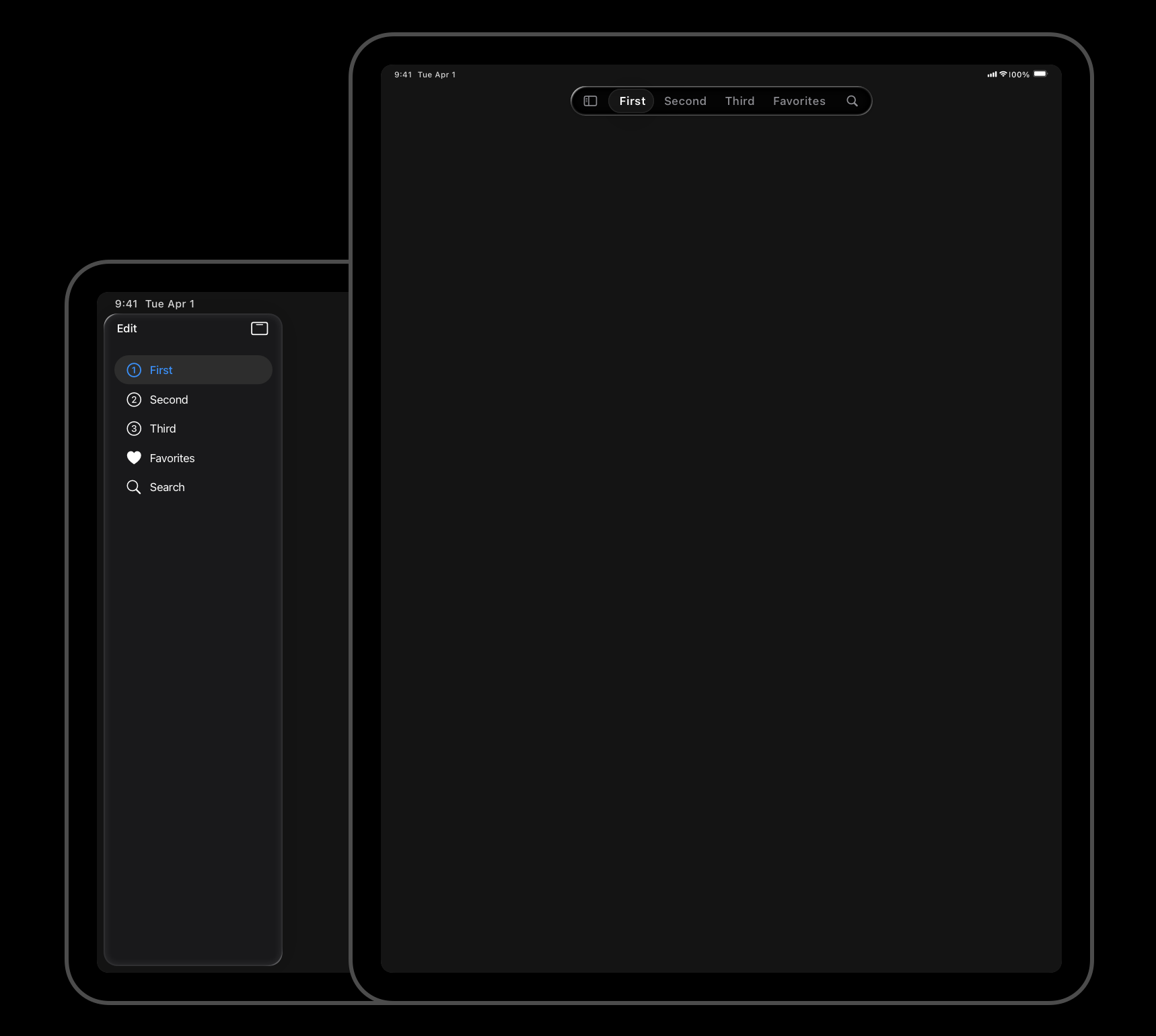
How We Got Duo Support in NetNewsWire What it took to support iPhone Duo in an app already built on standard controls and size classes. NetNewsWire Blog · Brent Simmons
Adapting your app for iPhone Duo "Adapting your app for iPhone Duo doesn't require reinventing your UI." Swift with Majid · Majid Jabrayilov
App Review 2.5.19: Your Feature Flags Need a Paper Trail (guidelines updated October 16)
Here is the new guideline in full:
Don't include any hidden, dormant, or undocumented features in your app; your app's functionality should be clear to end users and App Review. Attempting to hide undocumented features in your app binary, such as through code obfuscation or other methods, is grounds for removal of your app from the App Store and termination of your developer account.
Apple wrote this to go after apps that pass review as a photo editor and turn into a "nudification" tool a week later. Its announcement describes the problem as "adding features or functionality that weren't included in the version of the app that was submitted to App Review." The rule used to be a sentence inside 2.3.1. Now it has its own number and the penalty is your developer account.
You're not running a nudification app. But read the guideline again with your remote config dashboard open. "Dormant" covers a lot of normal practice: a feature that's compiled in and switched off until a marketing date, an A/B test arm the reviewer never lands in, a paywall variant that only shows in some countries. None of that is new or forbidden on its face. What's new is that a reviewer who stumbles on it later now has a guideline number to cite.
The cheap fix is to tell App Review what's in the binary. Something like this in the App Review Information notes for each submission:
Features behind remote flags in this build:
- Shared Lists (flag: shared_lists_enabled). Off at launch, rolling out to
  10% of users the week of Oct 27. Turned on for the demo account below.
- New onboarding (experiment: onboarding_v3). 50/50 test. The demo
  account sees variant B.
Demo account: review@example.com / [password]
That's an example, not Apple's wording, but it answers the question 2.5.19 asks: could the reviewer have known this was in there?
Two smaller changes matter if you touch the App Store side. New guideline 2.3.14 covers the product page header and search result artwork from #90. It rules out "unverifiable product claims, or specific or discounted pricing information," so "Rated #1" and "50% off this week" are both out. Guideline 1.2 now names nonconsensual intimate imagery, AI-generated included, and expects any app with user-generated content to prevent and remove it.


Strengthening App Review Guidelines against nonconsensual intimate imagery and bait-and-switch apps Why Apple added 2.5.19 and expanded 1.2, and how it enforces them. Apple Developer News
Updated App Review Guidelines now available Every change in the October 16 update, including 3.1.1(a) and section 5. Apple Developer News
HomeView: Your CarPlay Widgets Are Going to the Kitchen (iOS 27, HomeView on sale November 13)
HomeView is a 7-inch display that sits on a counter or mounts on a wall. It goes on sale November 13. There's no SDK, no simulator, and nothing in Apple's material about an App Store. Third-party content shows up through two existing doors.
The first is CarPlay. Apple's October CarPlay Developer Guide says audio and video apps "work on Apple HomeView without requiring you to make any modifications to your app." The developer agreement adds that this happens while the app runs on a paired iPhone, so what HomeView shows is the CarPlay interface of the app on your phone. If you passed on CarPlay video because no cars support it yet, HomeView is a better reason to revisit that.
The second is widgets, and it's written into the developer agreement you'll accept the next time you sign in. Section 6.4.1: "You agree that Your iOS Application widget may be made available on CarPlay and Apple HomeView." In practice, a widget that can appear on CarPlay can appear on HomeView.
Think about what your widgets look like on a screen in a shared kitchen. A banking balance, a health metric, the subject line of an email. Anything personal is now visible to everyone in the house. Anything that needs the phone unlocked, or a few taps to be useful, will just look broken.
The agreement says to use disfavoredLocations for widgets that aren't suitable, and that modifier has existed since iOS 17. The catch is that WidgetLocation has .carPlay but no HomeView value, so right now the only way to keep a widget off HomeView is to keep it off CarPlay too:
struct BalanceWidget: Widget {
    var body: some WidgetConfiguration {
        StaticConfiguration(kind: "Balance", provider: BalanceProvider()) { entry in
            BalanceView(entry: entry)
        }
        .supportedFamilies([.systemSmall, .systemMedium])
        // Keeps the widget out of the CarPlay gallery, and so off HomeView
        .disfavoredLocations([.carPlay], for: [.systemSmall, .systemMedium])
    }
}
.carPlay needs iOS 26. Blake Crosley's day-one roundup has the rest of what Apple published, including a new HomeView section in the widgets Human Interface Guidelines.
While you're in the agreement, it also adds terms for a Live Assistance API (3.3.8(j)) and an App Replacement Entitlement (3.3.8(k)). The announcement doesn't say what either one is, so those two paragraphs are the best hint so far of what's coming.
 Blake Crosley
Apple HomeView for Developers: What Apple Said on Day One Everything in the CarPlay guide, developer agreement, and HIG that applies to HomeView. Blake Crosley
Updated Apple Developer Program License Agreement now available The October 13 revision, including sections 6.4.1 and 6.4.2 on HomeView. Apple Developer News
Testing: A Real App Intents Test, End to End (iOS 27)
Calling intent.perform() from a unit test checks your Swift. It doesn't check whether Siri can find the intent, resolve the entity, and run it. iOS 27's AppIntentsTesting does that. Anton Gubarenko built a focus timer app to try it, and here's his test pieced together.
It lives in a UI test target, and it doesn't @testable import your app. The test launches the app and talks to it the way Siri does:
import XCTest
import AppIntentsTesting

final class FocusTimerIntentTests: XCTestCase {
    private let app = XCUIApplication()
    private var definitions: IntentDefinitions!

    override func setUp() async throws {
        app.launch()
        definitions = IntentDefinitions(
            bundleIdentifier: "com.example.FocusTimer"
        )

        // Seed known data through a debug-only intent
        try await definitions
            .intents["ResetFocusTimerTestStateIntent"]
            .makeIntent()
            .run()
    }

    func testStartTimer() async throws {
        let timer = definitions
            .entities["FocusTimerEntity"]
            .makeReference(identifier: "deep-work")

        let result = try await definitions
            .intents["StartFocusTimerIntent"]
            .makeIntent(timer: timer)
            .run()

        let returnedTimer: AnyAppEntity = try result.value
        let title: String = try returnedTimer.title
        XCTAssertEqual(title, "Deep Work")
    }
}
The reset intent is plain App Intents, wrapped in #if DEBUG with static let isDiscoverable = false so it never shows up in Shortcuts or ships in a release build.
Two things to know before you write a dozen of these. Intents and entities are looked up by their Swift type names as strings, so renaming StartFocusTimerIntent breaks the test. That's annoying, but it's also the point: the same rename would break your users' saved shortcuts. And results come back type-erased, so title is read dynamically and a typo only shows up when the test runs.
Anton's design advice is the part worth keeping: "The intent should remain an adapter." If perform() holds your business logic, these tests become slow unit tests. Keep the logic in a service you unit test directly, and use AppIntentsTesting only for the wiring.
 Anton Gubarenko
iOS 27: App Intents Testing "AppIntentsTesting doesn't make perform() a good place to put the entire application." Anton's Substack · Anton Gubarenko
Swift 6.4: some View? Without the Parentheses (Swift 6.4)
Swift used to read some View? as some (View?), which isn't a valid type, so we've all been writing (some View)?. SE-0521 in Swift 6.4 fixes the parse:
// Before
func badge(for user: User) -> (some View)? { ... }
weak var delegate: (any ScannerDelegate)?

// Swift 6.4
func badge(for user: User) -> some View? { ... }
weak var delegate: any ScannerDelegate?
The old spelling still compiles, so nothing breaks. Protocol compositions are the exception: any Codable & Sendable? is still an error, and you need (any Codable & Sendable)?. As Sarun Wongpatcharapakorn says, "The parentheses were only there to keep the parser happy."
 Sarun Wongpatcharapakorn
some View? without parentheses in Swift 6.4 SE-0521 and the one case where you still need parentheses. Sarunw · Sarun Wongpatcharapakorn
Accessibility: Status Dots That Work Without Color (iOS 13+)
Roughly one in twelve men has some form of color blindness. A green dot and a red dot look the same to a lot of them. Natascha Fadeeva's fix reads the Differentiate Without Color setting and adds a symbol only when the user has it on, so your design stays the same for everyone else:
@Environment(\.accessibilityDifferentiateWithoutColor)
private var differentiateWithoutColor

// On the status dot
.overlay {
    if differentiateWithoutColor {
        Image(systemName: isAvailable ? "checkmark" : "xmark")
            .font(.caption.bold())
            .foregroundStyle(.white)
    }
}
Status dots are the obvious case. Also check chart series told apart only by color, red validation borders on text fields, and toggles that rely on tint.

Supporting Differentiate Without Color in SwiftUI "If color is the only difference between two states, that information may not be available to everyone." tanaschita.com · Natascha Fadeeva
Quick Hits
macOS 27.2 finally lets you reset Local Network privacy for a single app: select it under Privacy & Security > Local Network and click the minus button. On iOS, TN3179 still says "the easiest option is to delete your app." App Attest is coming to the Mac in macOS 27, which Simon Støvring is already planning to use to protect his API endpoints. Jon Reid shows how to find SwiftUI views in unit tests by accessibility identifier, with small helpers so a test reads try sut.inspect().count() instead of walking the view tree. And Xu Yang's Swift Weekly #158 reports from Apple's first App Incubator in Beijing, where most finalists were polished subscription apps on top of someone else's language model, and asks what they're worth once that model's maker ships the same feature.
What to Do This Week
- Submit your Duo build today, built with Xcode 27.1.
- Open your remote config tool and list every flag that hides something already in the binary. Put that list in your App Review notes on the next submission.
- Check your product page header and search result artwork for prices, discounts, or "#1" claims.
- Go through your widgets and ask which ones you'd be fine seeing on someone's kitchen counter. Add
.disfavoredLocations([.carPlay], for:)to the rest. - Write one
AppIntentsTestingtest for the intent your users run most.
✌️ Alright, that's it for today! Let's spread the good code vibes ✨🧘☀️
Member discussion