Issue #93: iOS 27.2 is out, UIView margins went to zero, and the Duo is in people's hands
iOS 27.2 went out to everyone on Monday, three days after the iPhone Duo went on sale. That means two things for you this week. A UIKit default changed under your feet, and real people are now opening your app on a folding phone. Here's what broke for other developers in the first few days, what's new in the Xcode 27.2 RC, a URL.path deprecation where Xcode's suggested fix can break your file code, and a few SwiftUI fixes worth stealing. 📱🔧
UIKit: Default Layout Margins Are Now Zero (iOS 27.1+)
This one is buried in the iOS 27.2 release notes under "New Features," and it's the most likely thing in this issue to change how your app looks:
On iOS 27.1 and later, the default layout margins for aUIVieware zero. A view controller continues to provide its view withsystemMinimumLayoutMargins, which vary depending on the presentation context.
So a view controller's root view still gets margins. But any subview you create, a container view, a card, a custom cell content view, now starts with zero margins instead of the 8 points UIKit has handed out for years. If you pinned labels to layoutMarginsGuide inside one of those views, they're now touching the edges.
The fix Apple gives is to opt the subview back into its parent's margins:
let card = UIView()
card.preservesSuperviewLayoutMargins = true
// or set them explicitly if you relied on the old default
card.directionalLayoutMargins = NSDirectionalEdgeInsets(
    top: 8, leading: 8, bottom: 8, trailing: 8
)
Search your project for layoutMarginsGuide and layoutMargins, and check each hit on a 27.2 device. It applies on 27.1 too, so Duo users have been seeing it since Friday.
SwiftUI got its own version of the same idea. Sarun Wongpatcharapakorn covers contentMargins(for: .container), new in iOS 27.1, which pads a view by whatever margin the system uses for its container on that device:
VStack(alignment: .leading) {
    Text("Lily is sleeping.")
}
.contentMargins(for: .container, edges: .horizontal)
He measured why it matters: plain .padding(.horizontal) is 16 points everywhere, while the system margin is 20 on some models. If you want your custom content to line up with the navigation bar title, use the system value. On earlier iOS versions, fall back to padding behind an #available check.


iOS & iPadOS 27.2 Release Notes Includes the UIView layout margin change, App Tracking Transparency renames, and StoreKit Testing fixes. Apple Developer Documentation
How to use layoutMarginsGuide in SwiftUI "The system doesn't use the same margin on every device." Sarunw · Sarun Wongpatcharapakorn
iOS 27.2 Shipped: Check Your ATT Call and Your Subscriptions (iOS 27.2, stable)
iOS 27.2 (24B119) is out, along with macOS, watchOS, tvOS, and visionOS 27.2. Two things in it touch code or settings you own.
App Tracking Transparency. The alternative expanded prompt we covered in #88 is live for EU users, and it's the only prompt allowed in France, Germany, Italy, Poland, and Romania. If you adopted the new API during the beta, the name changed before release. requestTrackingAuthorization(usingExpandedInterface:...) is now requestTrackingAuthorization(preferExpandedInterface:...), and the Objective-C version is now requestTrackingAuthorizationPreferringExpandedInterface:. Code written against beta 1 won't compile against the final SDK.
Multiseat subscriptions are live. Since October 22, businesses and schools using Apple Business or Apple School Manager can buy seats of your subscription in bulk and assign them with their device management tools. This is on by default unless you changed it. If you don't want organizations buying your app this way, change the availability in App Store Connect. Group purchases, where one person buys seats for friends or family, come this winter, and Apple says you'll be able to test them in Sandbox starting in November.
The Xcode 27.2 RC (27B48) is what you build with to target 27.2. As of this morning Apple hasn't posted a final Xcode 27.2 on the releases page.


Offer your subscriptions to businesses and schools Multiseat purchasing through Apple Business and Apple School Manager is live, and on by default. Apple Developer News
Xcode 27.2 RC: Device Hub Can Shake, Drop, and Starve Your App (Xcode 27.2 RC)
The RC brings a batch of Device Hub tools, all simulator-only: Slow Motion Animation, Simulate Shake, Simulate Fall, and Simulate Memory Pressure. Memory pressure is the one to try first, especially if your app holds a big image cache. And Simulate Memory Warning, which didn't work in the earlier 27.2 betas, is fixed.
The RC also comes with two command-line tools for the JSON project format from #88, which Artem Novichkov wrote up. Neither is on your PATH, so run them through xcrun. xcprojformatter validates a project.xcproj and rewrites it with sorted keys and consistent layout, "like swift-format for code." xcodeproj reads and edits projects from the terminal: targets, build phases, groups, build settings, xcconfig files, and Swift packages. That second one is the bigger deal. Coding agents no longer have to edit project JSON by hand, and you can add a target in a CI script without Xcode open. Check the tool's built-in help to see what your build supports.
One known issue to plan around: cloning a 27.2 simulator can fail on file permissions. Apple's workaround, with your source device's UDID:
find ~/Library/Developer/CoreSimulator/Devices/<SOURCE_UDID>/data \
  -name '*.sb-????????-??????' -delete

Xcode Projects for the Command Line and Coding Agents What xcprojformatter and xcodeproj do, and why they matter for agents. Artem Novichkov
iPhone Duo, Week One: What Developers Ran Into (iOS 27.1)
The Duo shipped Friday, and the first reports are in.
Crunchy Bagel updated Streaks and two other apps. Their custom bottom toolbar didn't fit the Duo's vertical bar, so they rewrote it and moved Settings and the theme picker into the system bar. For Streaks Workout, they tried the same thing, found it "misaligned," and turned the vertical bar off. Where they spent real effort was the half-folded pose: during a seated workout, the ring and next exercise sit on the upright half, and the big timer, heart rate, and pause button sit on the flat half. That's the kind of design work that only makes sense once you've held the device.
Christian Beer found SwiftUI Table broken on the Duo and is working through it with an Apple engineer on the forums. If you ship a Table on iPhone, test it on a Duo or in the simulator before your users do.
Web developers got something too. Safari 27.1 on the Duo has previews of the Device Posture and Viewport Segments APIs behind feature flags (Settings > Apps > Safari > Advanced > Feature Flags). If you show web content in a web view, or run a companion site, this is how a page learns about the fold:
@media (device-posture: folded) {
  .reader { columns: 2; }
}

@media (horizontal-viewport-segments: 2) {
  .sidebar { width: env(viewport-segment-width 0 0); }
}
navigator.devicePosture.addEventListener("change", () => {
console.log(navigator.devicePosture.type); // "folded" or "continuous"
});For something fun on the native side, Natalia Panferova drives a SwiftUI animation from the hinge angle with onHingeChange, new in iOS 27.1. On other iPhones context.hinge is nil, so handle that case first:
Flower(bloom: bloom)
    .onHingeChange { _, context in
        withAnimation(.smooth) {
            guard let hinge = context.hinge else {
                bloom = 1
                return
            }
            if hinge.status == .closed {
                bloom = 0
            } else if hinge.status == .partiallyOpen {
                let progress = (hinge.angle.degrees - 80) / 90
                bloom = min(max(progress, 0), 1)
            } else {
                bloom = 1
            }
        }
    }
Her own advice is to save hinge-driven effects for things that respond to the folding motion itself. Layout belongs to size classes and reserved regions.
 Quentin Zervaas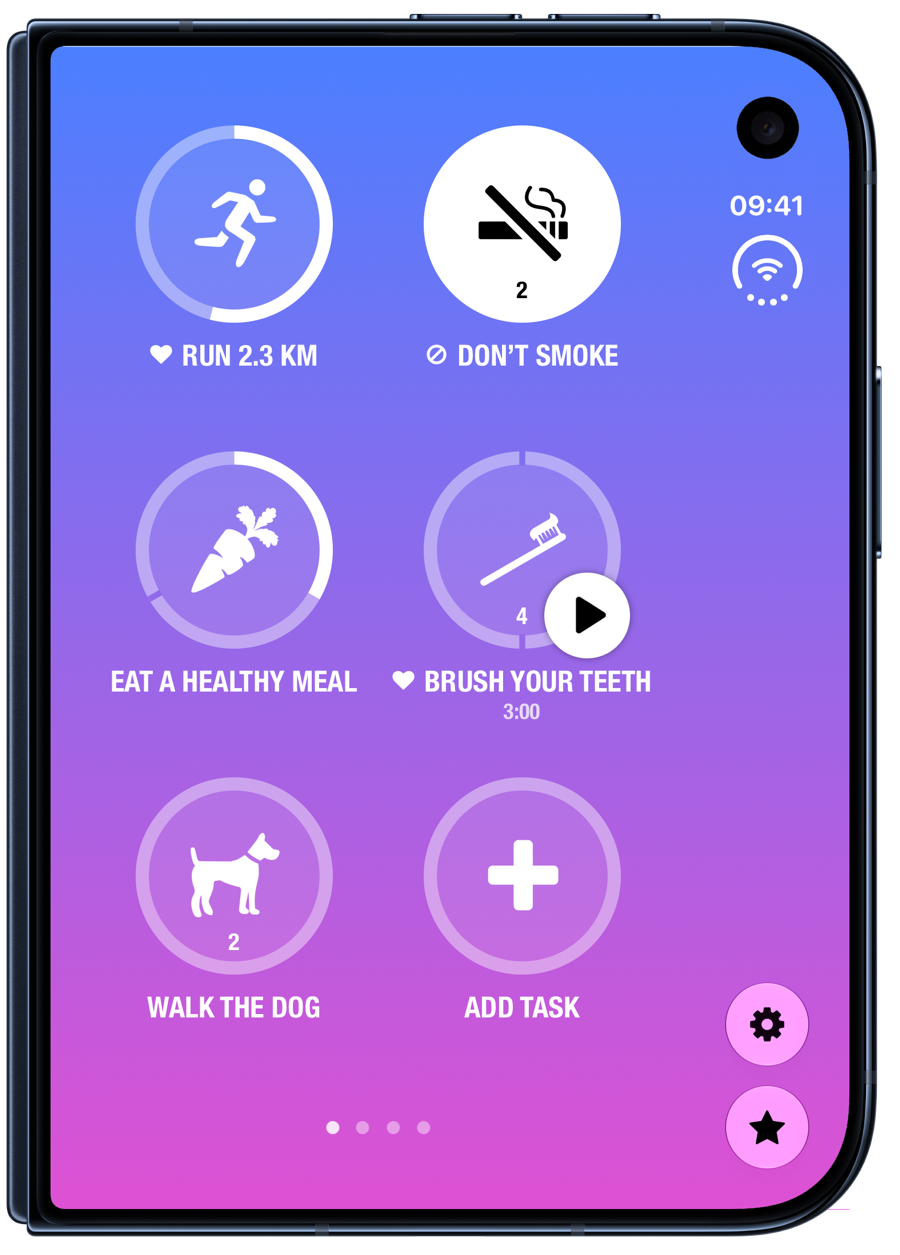
Updating Our Apps for iPhone Duo "We tried leaving our custom bars at the bottom and it just didn't feel right with this device." Crunchy Bagel · Quentin Zervaas
WebKit Features for Safari 27.1 Device Posture and Viewport Segments APIs on iPhone Duo, plus the viewport sizes for each pose. WebKit Blog
Driving SwiftUI animations with the hinge angle on iPhone Duo Use onHingeChange to animate views as the device folds and unfolds. Nil Coalescing · Natalia Panferova
Foundation: Don't Take Xcode's Fix for URL.path (all platforms)
Xcode warns that URL.path "will be deprecated in a future version of macOS: Use path(percentEncoded:) instead." Michael Tsai collected the reasons that suggestion can break your code.
First, the defaults differ. path returns an unencoded string. path(percentEncoded:) defaults to true, so url.path() gives you %20 where you had spaces. Second, relative URLs. Seth Willits found that for a URL relative to a base, like the one Bundle.main.url(forAuxiliaryExecutable:) returns, path gave an absolute path but path(percentEncoded: false) returned just tool. Tsai says this changed in macOS 26 and now resolves against the base URL, but the change was never announced.
The replacement that behaves like the old property everywhere:
// Same result as the deprecated url.path
let filePath = url.absoluteURL.path(percentEncoded: false)

// If you're on the swift-system FilePath API anyway
let filePath = FilePath(url)?.string
It's wordier, but don't let a fix-it rewrite every .path in your codebase to .path(). File URLs with spaces in them will break, and you won't find out until someone's username has a space in it.
 Michael J. Tsai
Getting a File Path From a Swift URL Why path(percentEncoded:) isn't a drop-in replacement for URL.path. Michael Tsai - Blog
SwiftUI: Paging That Drifts Off by a Few Points (iOS 17+)
You build a horizontal pager with .scrollTargetBehavior(.paging) and containerRelativeFrame(.horizontal). Page one looks perfect. By page four, you can see a sliver of the next page. Natalia Panferova tracked it down: LazyHStack has default spacing, so every page adds a few points of drift. Set it to zero:
ScrollView(.horizontal) {
    LazyHStack(spacing: 0) {
        ForEach(1...5, id: \.self) { page in
            PageContent(page: page)
                .containerRelativeFrame(.horizontal)
        }
    }
}
.scrollTargetBehavior(.paging)
If you want visible gaps, put horizontal padding inside each page before containerRelativeFrame. It won't affect where paging stops.
 Matthaus Woolard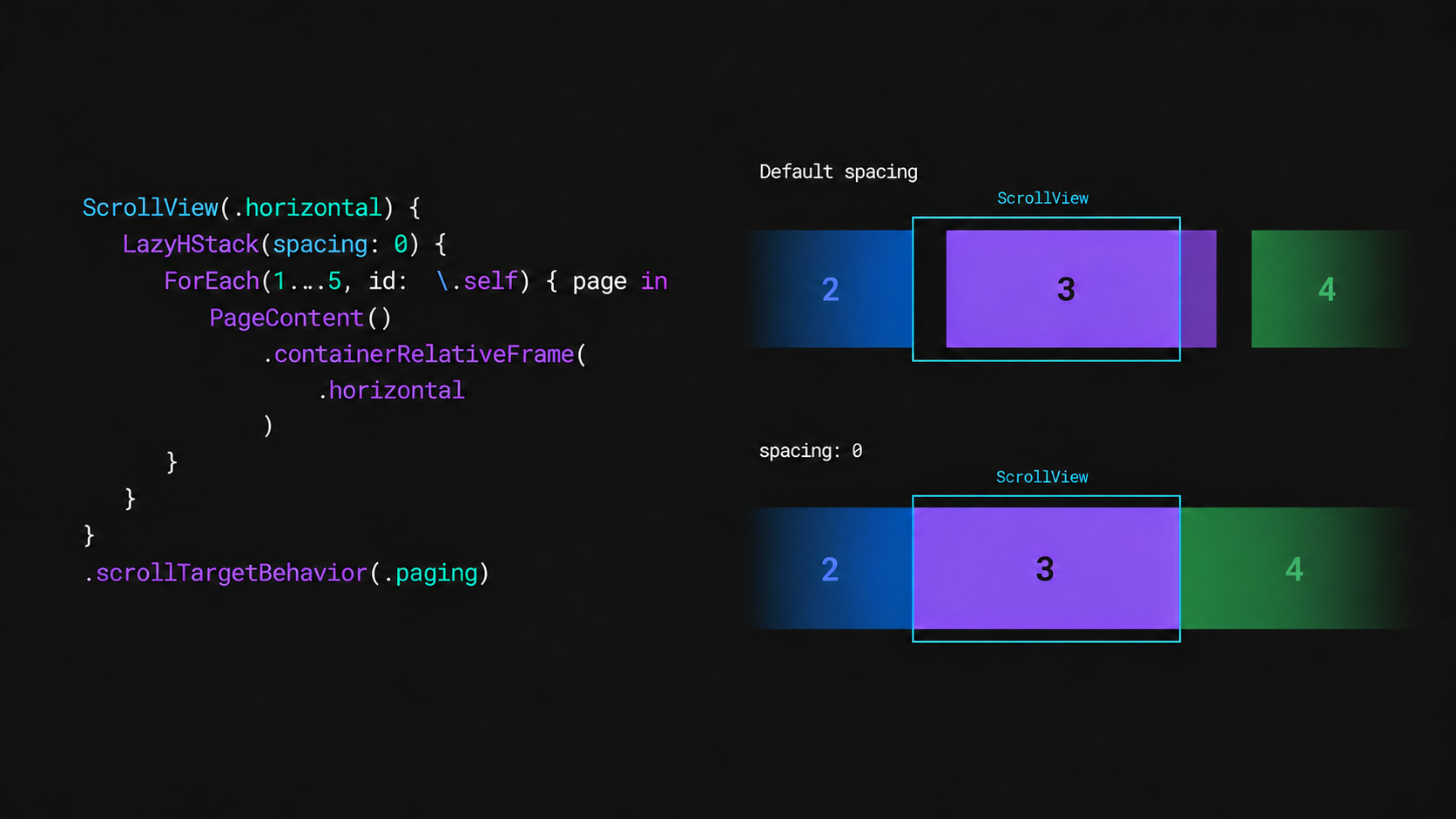
Fix misaligned paging in SwiftUI scroll views "Without the gaps, each page starts exactly where paging stops." Nil Coalescing · Natalia Panferova
Accessibility: Make a Custom Control Behave Like a Slider (iOS 15+)
A waveform scrubber you drew yourself is a blob to VoiceOver. Natascha Fadeeva keeps the custom drawing and drag gesture, and tells assistive technologies to treat it as a native Slider bound to the same value:
WaveformScrubber(position: $position, duration: duration)
    .accessibilityRepresentation {
        Slider(value: $position, in: 0...duration, step: 1) {
            Text("Playback position")
        }
        .accessibilityValue(formattedPosition)
    }
VoiceOver users get swipe-up and swipe-down adjustment and a spoken value for free, and because both share $position, the waveform updates when they adjust it. The same trick works for custom toggles, steppers, and segmented pickers.
https://tanaschita.com/ios-accessibility-representation-custom-controls/
Making custom SwiftUI controls accessible with accessibilityRepresentation "Native SwiftUI controls already provide information and interactions that assistive technologies can understand." tanaschita.com · Natascha Fadeeva
Quick Hits
If you build a presentation app for iPad, iPadOS 27 has a bug where tapping another app while AirPlaying can mirror your whole screen to the external display. WebKit in the 27 releases now blocks some identity-resolution domains, which matters if your app embeds an ad or attribution SDK that runs in a web view. Xcode Cloud has its own section in App Store Connect now, so update your team's bookmarks. The new iPad mini has an 8.5-inch OLED display and supports extended displays on iPadOS 27.2, which is one more screen size for your iPad layouts. In Swift Weekly #159, Xu Yang looks at SimRun, an open-source experiment that runs simulator apps in their own Mac windows. And one longtime iOS course creator is shutting down his course business because AI cut his sales, making his old courses free until November 24.
What to Do This Week
- Search for
layoutMarginsGuideandlayoutMarginsand check each screen on iOS 27.2. AddpreservesSuperviewLayoutMargins = truewhere content now touches the edges. - If you adopted the expanded ATT prompt in the beta, rename the call to
preferExpandedInterface:and rebuild with the Xcode 27.2 RC. - Decide whether you want businesses and schools buying seats of your subscription, and set it in App Store Connect.
- Run your app under Simulate Memory Pressure in Device Hub.
- Don't accept the
URL.pathfix-it. Replace it withurl.absoluteURL.path(percentEncoded: false). - If you ship a SwiftUI
Tableon iPhone, open it on a Duo.
✌️ Alright, that's it for today! Let's spread the good code vibes ✨🧘☀️
Member discussion