Issue #88: Your project file goes JSON, the Duo simulator lands, and toolbars turn sideways
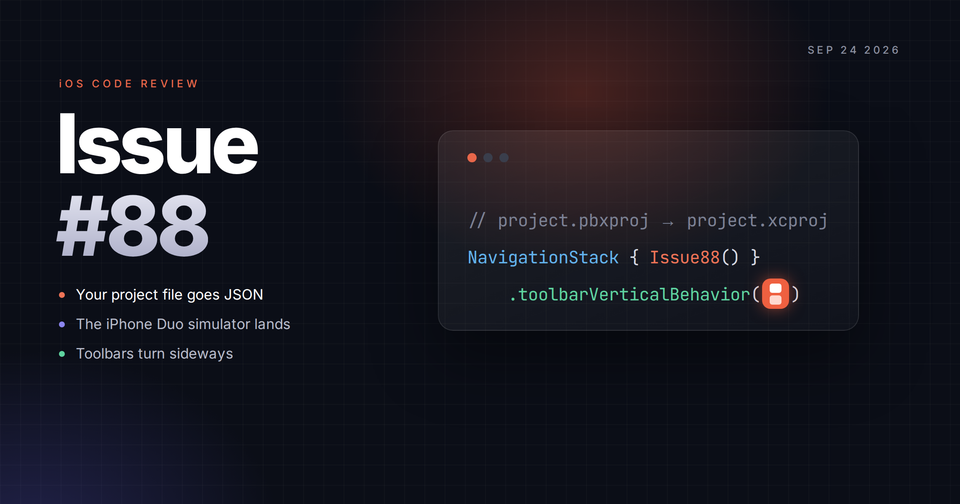
Two betas dropped this week, and one of them is going to change your pull requests. Xcode 27.2 beta ships a JSON project format that makes project.pbxproj merge conflicts optional, and Xcode 27.1 beta finally gives us the iPhone Duo simulator. We also have vertical toolbars, a clean way to backport them, a launch argument that finds your slow ForEach, crash reporting that runs outside your app, and a subscription setting that's already switched on in your account. 🚀📱
Between two new betas, a Duo build going out to TestFlight testers, and iOS 27 now on your users' phones, bug reports are about to come in from everywhere this month. This week's sponsor, Runway, built a tool to keep them in one place.
Sponsored by Runway
How many app issues fell off your radar this week?

Mobile teams deal with a firehose of incoming issues: regressions from QA, beta feedback, App Store reviews, crashes, etc. AI code makes managing this even harder. Triage by Runway pulls every issue into one inbox, de-dupes, assigns, and tracks fixes so nothing is missed. See how it works.
Xcode 27.2 Beta: Your Project File Is Now JSON (Xcode 27.2 beta)
Xcode 27.2 beta (27B5019j) adds a second project format, project.xcproj, alongside the project.pbxproj we've been hand-merging for years. Apple describes it as "more readable, merge-friendly, and easier for coding agents to edit." New projects created in 27.2 use it by default. Existing projects stay on pbxproj until you switch them: select the project in the Project navigator, open the File inspector, and set Project Format to JSON.
Xu Yang compared the two formats side by side. Here's a file reference in the old format, identified by a hex ID that other sections point back to:
A1B2C3D4E5F6789012345678 /* ContentView.swift */ = {
    isa = PBXFileReference;
    lastKnownFileType = sourcecode.swift;
    path = ContentView.swift;
    sourceTree = "<group>";
};
And the same file in the new one, sitting in a tree that matches the Project navigator and listing its own target membership:
{
  "kind": "group",
  "path": "Sources",
  "children": [
    { "path": "ContentView.swift", "target-membership": [ "MyApp/compile-sources" ] }
  ]
}
Adding a file to a pbxproj touches the file reference, the group, and the build phase, all in different parts of the file. In xcproj it's one line under the group, so two people adding files on two branches mostly stop colliding. In Xu Yang's words, "One very small shared change can leave traces in many non-adjacent places."
Before you switch, check your team's Xcode versions. The JSON format opens in Xcode 27 and later, so anyone still on Xcode 26 is locked out of the project. It also only replaces the build graph. Schemes, Package.resolved, and user data don't change. Tuist users won't see a difference yet, and XcodeGen will need to add support before it can write the new format. If you want to go back, discard the new .xcproj and restore the .pbxproj in source control.
From pbxproj to xcproj: Xcode Project Configuration Gets a JSON Format "Same project model, different expression. It is not a new project DSL, nor a replacement for project manifests." Fatbobman's Blog · Xu Yang
Updating your Xcode project configuration file format Configure your Xcode project to use the JSON project configuration file format that's more human-readable and editable by coding intelligence agents. Apple Developer Documentation
Two smaller notes from the 27.2 release notes. The RenderPreview MCP tool now lists the available render destinations and lets your agent choose one. And if Xcode crashes during code completion on macOS 27.2 beta, Apple's workaround is to turn off enhanced completion ranking:
defaults write com.apple.dt.Xcode CodeCompletionAssetsToLoad /dev/nullFrom the Community!
You all are shipping some great stuff, and these three picks come straight from the iOS Code Reviews community. Check them out and show some love to the developers building them! 🛠️
 | A day planner for time blindness. Give each task a time estimate and watch your finish time move, then work through distraction-free focus sessions with Live Activities and a Dynamic Island. |
 | A habit tracker built around monthly goals instead of streaks, so one missed day doesn't wipe out your progress. Set a target like 20 workout days this month, check habits off on a calendar, and see your whole year in Insights. Includes Home Screen and Lock Screen widgets, works offline, and tracks three habits free on iPhone, iPad, Mac, and Apple Vision Pro. |
Want your tool, Mac app, or iOS app in the classifieds next week? Placements are $30. Reply to this email or write to ioscodereviews@gmail.com.
Xcode 27.1 Beta: The iPhone Duo Simulator (Xcode 27.1 beta / iOS 27.1 SDK, beta)
Xcode 27.1 beta (27A9269) came out September 18 with the iOS 27.1 SDK and the iPhone Duo simulator runtime. It includes Swift 6.4 and needs macOS Tahoe 26.6 or later. You also get a Display group in the Previews canvas overrides picker, so you can check a preview on the Duo's other display without running the app.
If the version numbers look odd, that's because iOS 27.1 is only for iPhone Duo, which ships on it October 23. Every other device goes from 27.0 straight to 27.2, which is already on beta 2 (24B5089g). Michael Tsai collected the reactions, including John Gruber's "developers wanted this SDK a week ago." For your setup, this means Duo work happens in Xcode 27.1 beta, and everything else you want to test against the next release happens in 27.2 beta. Apple's 27.2 notes say the same thing.
Plan for three simulator known issues: the first launch "can take several minutes," StandBy isn't available, and most app extensions can't be run or debugged in the Duo runtime. Mac Catalyst apps have their own problem. Any iOS 27.1-only API fails to compile when you build for Catalyst, so wrap it:
#if !targetEnvironment(macCatalyst)
// iOS 27.1 / iPhone Duo-only code here
#endif
If your target is set to iOS 27.1 and the Catalyst run destination disappears, add a Mac Catalyst 27.0 minimum deployment in target settings.
Device Hub can fold the simulator, but there's no simctl command for it, so scripts and agents can't. Artem Novichkov released a CLI for that on Saturday:
brew install artemnovichkov/tap/hinge

hinge half                # 90 degrees
hinge sweep 0 180 3       # animate from closed to flat over 3 seconds
hinge get                 # print the current angle
It comes with an agent skill, so the agent that's already taking your simulator screenshots can fold the device between them.
Xcode 27.1 Beta Release Notes Update your apps to use new features, and test your apps against API changes. Apple Developer Documentation
hinge Control the hinge angle of a foldable iPhone Simulator (iPhone Duo) from the CLI or AI agents. GitHub · Artem Novichkov
 Michael J. Tsai
TestFlight accepts builds made with Xcode 27.1 beta, so testers can start on your Duo build today. For the full story on the release numbering, read Jumping to 27.2 on Michael Tsai's blog.
iPhone Duo: Vertical Toolbars (iOS 27.1 SDK, beta)
On the Duo, navigation controls, toolbar items, and tabs can move into a vertical bar along the edge of the screen. Your content gets more height, and any toolbar label that assumed a wide, short slot now has to fit a narrow, tall one. Natalia Panferova covers the four APIs that control this.
axisBehavior(_:) lets an item move into the vertical bar, and the toolbarVerticalEdge environment value tells your label when it has:
ToolbarItem(placement: .bottomBar) {
    Menu {
        // Actions for choosing the line width
    } label: {
        VStack {
            Capsule()
                .frame(width: 24, height: width)
            Text("\(width, format: .number) pt")
        }
    }
}
.axisBehavior(.verticalPreferred)

struct AdaptiveToolbarLabel: View {
    @Environment(\.toolbarVerticalEdge) private var verticalEdge
    // Switch between a horizontal and vertical label here
}
When tabs and toolbar items don't both fit, toolbarVerticalCompressionBehavior(.prefersTabBar) picks which one keeps its space. To turn the vertical bar off, use toolbarVerticalBehavior(.disabled). Sarun Wongpatcharapakorn uses it on sheets that only have a Close button, since giving a whole edge of the screen to one button is a waste:
.sheet(isPresented: $showsHelp) {
    AnnotationHelp()
        .toolbarVerticalBehavior(.disabled)
}
Sarun also points out that "many system UI components already have fold avoidance built in, including sheets, alerts, and menus." So test your custom overlays and popovers first.
Configuring SwiftUI toolbars on iPhone Duo Manage toolbar item presentation on iPhone Duo using new iOS 27.1 APIs for custom labels and action prioritization. Nil Coalescing · Natalia Panferova
Sheets and fold avoidance on iPhone Duo Part 4 of a series on adapting your app for iPhone Duo, covering how sheets and system components move around the fold in each pose. Sarunw · Sarun Wongpatcharapakorn
A follow-up on the ArrangementView section from last issue: Xu Yang spent a week with it and has doubts. "Primary" and "secondary" mean visibility priority in .split and stacking order in .overlay. Switching between the two styles is an if/else with no transition. And no single API tells you which arrangement the user is looking at right now. His advice is to use NavigationSplitView when your two views are a list and its detail, and to keep ArrangementView for when "an interface genuinely needs a custom split or overlay." Read ArrangementView: Think Before You Arrange before you commit to it.
 Fatbobman
SwiftUI: Backport the Duo APIs Without Raising Your Deployment Target (Swift 6.4, iOS 26+)
Every API in the section above requires iOS 27.1, and your deployment target isn't moving to 27.1 in October. Majid Jabrayilov wraps the new modifier in one of his own and uses availability attributes to remind you to remove it later:
@available(iOS, introduced: 26.0, deprecated: 27.1, obsoleted: 28.0, message: "Get rid of ported version")
public enum PortedToolbarVerticalBehavior {
    case automatic
    case disabled
}

extension View {
    @available(iOS, introduced: 26.0, deprecated: 27.1, obsoleted: 28.0, message: "Get rid of ported version")
    @ViewBuilder func portedToolbarVerticalBehavior(_ behavior: PortedToolbarVerticalBehavior) -> some View {
        if #available(anyAppleOS 27.1, *) {
            switch behavior {
            case .automatic:
                toolbarVerticalBehavior(.automatic)
            case .disabled:
                toolbarVerticalBehavior(.disabled)
            }
        } else {
            self
        }
    }
}
Look at the deprecated: 27.1 argument. Once you raise your deployment target to 27.1, every call site gets a warning, and you delete the wrapper instead of carrying it around for three years. anyAppleOS is a Swift 6.4 addition that covers every Apple platform in one availability check. If you'd rather write .backport.toolbarVerticalBehavior(.disabled), Majid shows that namespace version too.
 Majid Jabrayilov
Backporting SwiftUI APIs "Backporting new SwiftUI APIs allows us to adopt the latest platform features without immediately raising the deployment target of the entire app." Swift with Majid · Majid Jabrayilov
SwiftUI Performance: Find the ForEach That Loads Every Row (iOS 17+)
If a List or LazyVStack hitches the first time it appears, look at your ForEach. When it can return a different number of views for different elements, SwiftUI has to run the content closure for every element up front to work out row identity, including rows nobody has scrolled to. Natalia Panferova found a launch argument that makes SwiftUI log it: add -LogForEachSlowPath YES under Run > Arguments > Arguments Passed On Launch in your scheme.
It usually comes from one of two patterns: an if inside the ForEach that skips some elements, or an if that adds an extra view to some rows. For the first, filter the array before you pass it in. For the second, wrap the row in a container so every element returns exactly one view:
LazyVStack {
    ForEach(messages) { message in
        VStack {
            if let date = message.dayHeading {
                Text(date, format: .dateTime.month().day().year())
            }
            Text(message.text)
        }
    }
}
Diagnosing ForEach performance issues in SwiftUI lazy containers "To determine all row identifiers upfront, SwiftUI must evaluate the content closure for every element, including those whose rows are offscreen." Nil Coalescing · Natalia Panferova
 Natalia Panferova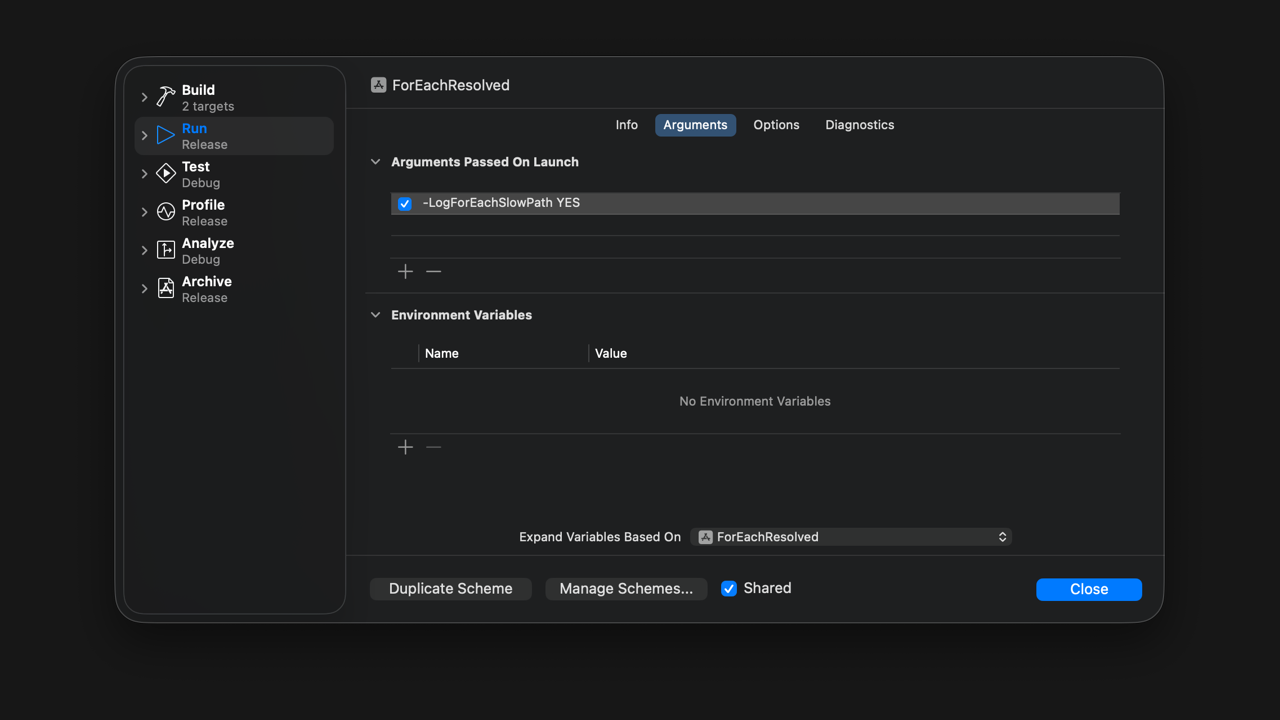
Crash Reporting From Outside Your App (iOS 27, stable)
Third-party crash reporters work by installing signal handlers in your app, which means their code runs inside a process whose memory is already corrupted, where very little is safe to call. iOS 27's CrashReportExtension moves that work into a separate extension process that runs after your app has crashed, with the crashed process passed in:
import CrashReportExtension

@main
struct UtilityCrashReporterExtension: CrashReporterExtension {
    func processCrashReport(process: CrashedProcess) {
        // Inspect the crashed application here.
    }
}
Anton Gubarenko went through what the extension can see: the Mach exception type and codes, the loaded binary images, symbol lookup, and a read-only corpse port. What it can't see is your Swift error values, and there are no ready-made thread backtraces. It also doesn't run for Catalyst apps or for iOS apps running on Apple silicon Macs. To set it up, start from the Crash Report Extension template, give it a bundle ID under your app's, and add an App Group if the app needs to read the reports.
iOS 27: CrashReportExtension Framework "The extension is not a continuation of the app. It is its own app-extension process." Anton Gubarenko
 Anton’s Substack
StoreKit: Bundles, Suites, and Multiseat (iOS 27, rolling out)
Apple announced three subscription features on September 16, and you need StoreKit 2 for all of them.
A Bundle packages up to five auto-renewable subscriptions into one purchase. They can come from your own apps or from up to five different developers, as long as they all have the same duration. A Suite is one subscription that unlocks up to 15 of your own apps. Both arrive later this year on iOS 27 and later, and you apply through a form in App Store Connect. One warning if you're testing locally: the 27.2 beta 2 notes list a StoreKit Testing bug where buying a subscription that belongs to a bundle lets the user unbundle it instead of throwing an error.
Multiseat covers organizations buying seats in bulk. Volume Purchasing through Apple Business and Apple School Manager starts October 22, and Group Purchases, where a subscriber buys extra seats and invites other people, follows this winter. Multiseat is already on by default in App Store Connect, so decide whether you want it before October 22. App Store Connect API 4.5 (September 22) adds marketSettings and multiSeatStatus to Subscription so you can check this from scripts, plus a performance overview endpoint that returns the same metrics as Xcode's performance reports.
Also from September 16: starting with iOS 27.2, EU apps can show an alternative App Tracking Transparency prompt and re-prompt once a year. In France, Germany, Italy, Poland, and Romania, the alternative prompt is required.
Get your subscriptions ready for iOS 27 Offer multiple subscriptions as a single In-App Purchase with Bundles and Suites, and let organizations and groups buy seats in bulk. Apple Developer


Quick Hits
Jordan Morgan shares Early Design Explorations for iPhone Duo Layouts from Elite Hoops, including using ArrangementView to show play notes next to the play when the phone is open, and dropping the rounded bottom corners that look fine on other iPhones but wrong on the Duo. Artem Novichkov put together iPhone Duo by Examples, a SwiftUI sample project covering the hinge angle, reserved regions, ArrangementView, and the vertical toolbar. And on the server, Vapor 5 beta is out, rewritten around async/await with no more EventLoopFuture, and it requires Swift 6.4.
What to Do This Week
Pick one project, switch it to the JSON format on a branch, and see how the diff looks, but don't merge it until the whole team is on Xcode 27. Install Xcode 27.1 beta alongside Xcode 27, run your app on the Duo simulator in every pose, and script it with hinge sweep so you can rerun it. If you ship on the Mac, put your 27.1-only code behind #if !targetEnvironment(macCatalyst). Use Majid's deprecating wrapper for the vertical toolbar modifiers instead of raising your deployment target. Add -LogForEachSlowPath YES to your debug scheme and fix whatever it logs. Then open App Store Connect and decide on multiseat before Volume Purchasing goes live on October 22.
✌️ Alright, that's it for today! Let's spread the good code vibes ✨🧘☀️
Member discussion